
WhatsApp Chat Assistant
Zipeeed's chat assistant turns your website into a WhatsApp conversation starter: visitors chat with you right from a widget on your website.
Every message lands directly in your team's WhatsApp, no app to install, no account to create, and no lead sitting unanswered in a contact form or an inbox nobody checks. Your team replies from one shared staff portal, and the conversation streams back to the visitor in real time, on the same channel they already use every day.
Visitors never leave your site to start a conversation, and your team never has to leave WhatsApp to answer one.
Every teammate signs in with a link and sees the same conversation list, in real time.
When a visitor starts a conversation, they can get an instant "we got your message" reply on WhatsApp even before a staff member responds.
Hi Adrian! 👋 Thanks for reaching out to Zipeeed. We've got your message and someone from our team will reply here shortly.
The staff portal lets teammates set up template responses for frequently asked questions, so common answers are one click away.
Thanks, {{name}}. Could you share a few more details or screenshots regarding what you're experiencing so we can look into it right away?
Note: Your team and your visitors' data are not shared with Zipeeed or any third party.
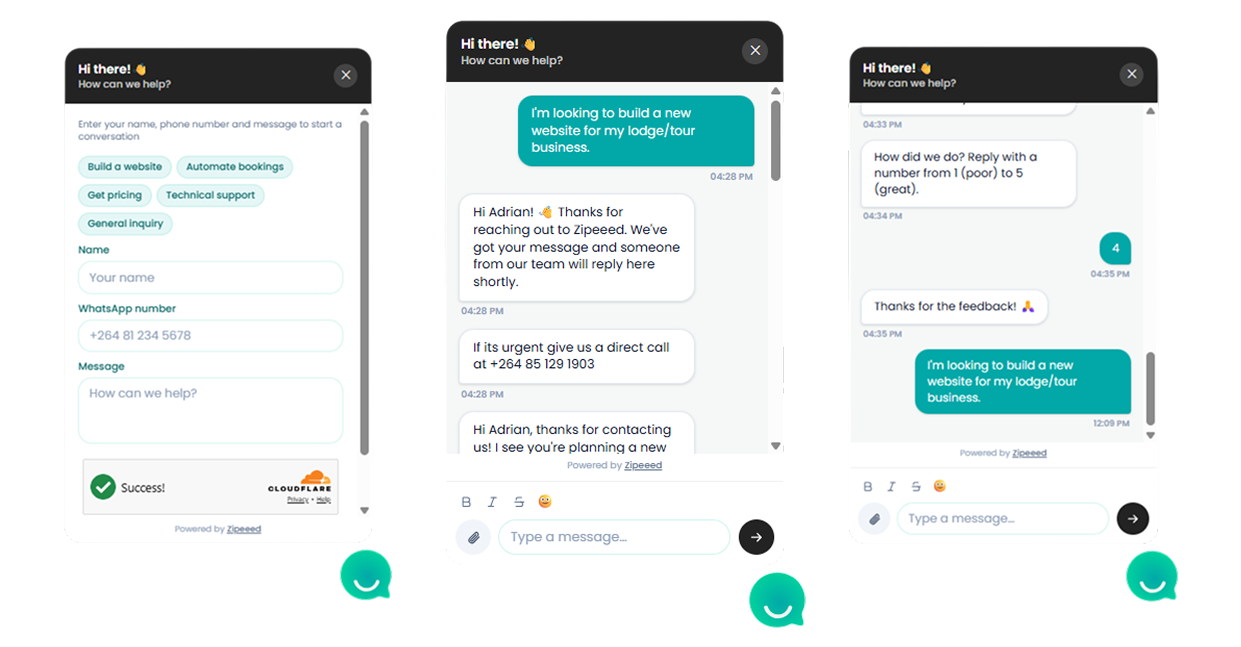
Getting Started with the Chat Widget
A chat bubble appears in the corner of the page, wherever it's embedded. Clicking it opens a small conversation window with a short intro message and a form asking for the visitor's name and, optionally, their own WhatsApp number.
Once they send a message, it's delivered to your connected WhatsApp number, and any reply your team sends shows up back in that same widget window in real time.
New conversations are pushed straight to your team's connected WhatsApp number.
Your team replies from the staff portal, and those replies stream back to the visitor's browser without a page refresh.
If a visitor also gave their own WhatsApp number, they can optionally get an automatic acknowledgment message on WhatsApp confirming their message was received.
A WhatsApp connection, so the widget has somewhere to send messages. The widget embedded on your site, added to the page(s) where visitors should be able to reach you. Once both are in place, your team can start receiving and replying to conversations from the staff portal.
Go to the https://businessName.zipeeed.com/staff, enter your work email address. Only addresses on the staff allowlist can sign in — if yours isn't recognised, ask whoever manages the deployment to add it.
You'll receive a sign-in link by email. Click it to log in. Sign-in links expire after a short time, so use them promptly. If a link has expired, just request a new one from the login page.
Once signed in, you'll see a list of active conversations, each one started by a visitor through the widget. Selecting a conversation shows the full message history between that visitor and your team. New messages appear in real time, you don't need to refresh the page to see a visitor's latest message or a WhatsApp reply.
Type your reply in the message box at the bottom of a conversation and send it. Your reply is delivered two ways at once: Back into the visitor's chat widget window, in real time to the visitor's own WhatsApp number.
Conversations stay in the list so you can pick up a thread later — history is kept, not just the current session.
Multiple staff members can be signed in and reply to different conversations at the same time.
If nothing is coming through, confirm your WhatsApp connection is healthy with whoever manages the deployment.
Use the Templates button above the reply box to send common answers without retyping them each time.